Showing posts with label firewall. Show all posts

Wednesday, February 28, 2018

Windows Firewall Issue

Hello,

Many times my customers write me after they have purchased program. Common reason is that some computers can send and receive note and some computer(s) can only send or only receive note. I always reply to my customers and write them to make sure that Windows Firewall settings are correct, meaning that ShixxNOTE program have opened default port 2000 for communication. So you can open default port 2000 or gave permission to ShixxNOTE program in Windows Firewall settings. This is always happening because when customer install program on a computer and then start program for the first time, Windows Firewall dialog prompts and they doesn't know what to click on it.

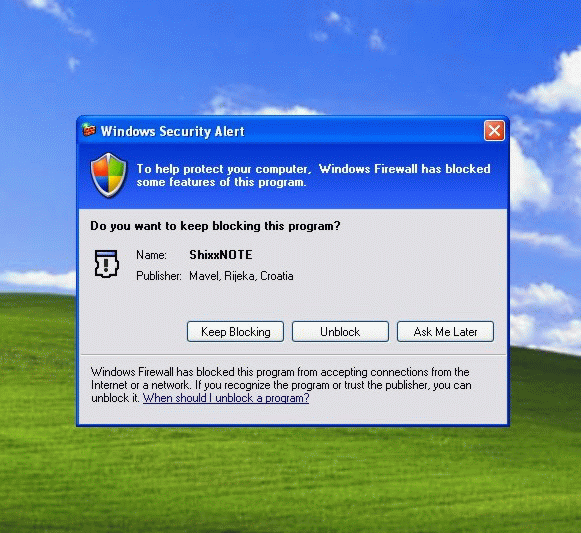
So now I will put Windows Firewall images and what customer or simple 30-days trial user must click when program is installed and started first time on the computer. If you install program on Windows XP then you will get this dialog where you must click on the Unblock button like on an image below.


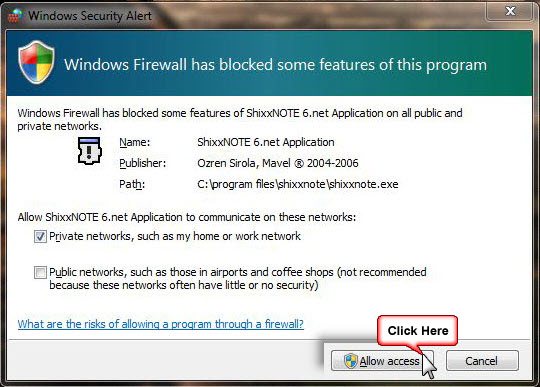
If you are installing ShixxNOTE on Windows 7 or Windows 10 you will get again Windows Firewall dialog where you must click on Allow Access button like on an image below.


If you do this at the program first start up you will have no problems later with sending or receiving notes.

Kind regards,

Ozren Sirola
ShixxNOTE program author

Wednesday, November 27, 2013

Frequently Asked Questions (FAQ)

Hello,

I will quote one email sent to me from my trial program user which have some problems.
I'm running a trial version of Shixxnote, and it appears that I can send notes from Windows 7 computers to Windows XP computers, but I can't do the opposite - send notes from Windows XP computers to Windows 7 computers on my network. Is this a known issue? Do you have any troubleshooting steps I can take? My firewall is disabled on all computers.
 This is not a first time that I've receive this kind of mails. Always one computer can send note but can not receive note or otherwise. Problems with sending or receiving notes in your LAN, that is this article about. I will try to help you and write you solutions for that kind of problems with ShixxNOTE 6.net

Also you will read how my customer above solve the problem. So when you install ShixxNOTE 6.net in your LAN of few computers but some of them have different kind of Windows OS. Maybe you will expirience problem like my customer did. He could send notes from Windows 7 computer but he could not receive notes from Windows XP computers. Than I wrote him simple steps to check and to solve the problem.

Considering that I have customer with same problem I wrote him this, because my previous customer has also some troubleshoot and we solve the problem.

I have one customer who just renamed computer name on Windows Seven and then after that he could send note to everybody. So I wrote my trial user that he tries this solution also. And guess what that also solved his problem. I don't know why but problem was somewhere in WORKGROUP, because Windows 7 is new OS he could only send note but not receive. If you ever have this kind of problem please first do this just rename the name of your computer. Here is the screenshot where you can see how to change your computer name in Control Panel.

How to change your computer name on Windows 7
So this is my first advise to you if you have similar problems with ShixxNOTE 6.net. But also if this doesn't work that try this.

Check on every computer which are using program if they have same workgroup.

Try to send note directly to yourself, open "Send note to ..." dialog and write your computer name in recipient list. After you click on send button you must receive identical note.

Finally first thing I always advise is to check Windows Firewall settings on every computer running ShixxNOTE 6.net. Program is written in C++ and is using port 2000 to send and receive notes. And If Windows 7 comp doesn't have open port 2000 then you will be not able to receive notes.

That was all I want to share with you if you have some problems with sending and receiving notes.

Kind regards,

Ozren Sirola
ShixxNOTE program author

Wednesday, August 09, 2006

Windows Firewall and ShixxNOTE

Windows 7 Firewall security dialog where you must click Allow Access button to enable sending and receiving notes
If you have Windows Firewall activated on your computer and it is "On", after ShixxNOTE program first start you will probably get Windows Security Alert dialog. If you have Windows 7 installed then you will get dialog (first picture above) asking you to allow access to ShixxNOTE program ; if you have Windows XP then dialog (second picture) will appear asking you to unblock program (check the picture above). This is normal because ShixxNOTE is multi thread client/server application (LAN messenger). You can send note and receive notes to others in your LAN. For sending and receiving notes ShixxNOTE program communication port must be open. So if you get this dialog you have to click on Unblock or Allow access button to enable sending and receiving note(s) feature. After you click "Unblock" or "Allow access" ShixxNOTE program will be added in Windows Firewall - Exceptions dialog and will work properly in your network.

Windows XP Firewall security dialog where you must click Unblock button to enable sending and receiving notes
If you have Windows 7 installed then you can open Windows Firewall with Advanced Security dialog and if you allowed access to program you will get dialog like picture bellow.

Windows 7 Firewall with Advanced Security dialog (click to see larger image)
If you click Cancel or Keep Blocking button then you will not be able to receive notes from others. Because Windows Firewall will block incoming note data for ShixxNOTE program.

Also you can always open ShixxNOTE communication port "2000" manually in "Local area connections" - "Advanced tab". If you don't know how write me and I will help you.

If you have any problems with sending or receiving notes in program, check your firewall settings first. If you didn't fix the problem ask your network administrator to help you.

And finnaly write me if you have any problem regarding sending and receiving notes, or any other problems with program.

Ozren Sirola
admin@shixxnote.com