Showing posts with label ShixxNOTE. Show all posts

Thursday, March 17, 2022

ShixxNOTE 7.net is released

Today in March 2022, new program version ShixxNOTE 7.net Build 145 is released. After many years finally program again at the start, scan your network neighborhood for other computers. So now when you go to Send note to others dialog you will see in Network Neighborhood list all computer names which program found. After you select and add computer name it will go to Recipients List. In Recipient List you can add not only computer name, but also you can add IP address or email address. If you have email address in recipients list, program will ask your permission to run you mail client and then will send ShixxNOTE email note which contain note data (note color, title color, formatting, note text, etc.).

As you can see ShixxNOTE 7.net works normally on latest Microsoft Windows 11. Main settings dialog now looks different. To refresh dialog new images are added. From main program menu (right mouse click on program try icon) select “Settings” and you will get General, Default note and Network settings dialog. There you can change how program will behave.


Network settings are important for users who like to send note to others. There you can change main ShixxNOTE 7.net program communication port 2000 to some other. Use this settings carefully. Also you can send note anonymously if you change option Default sent from option in Network settings dialog. After that when note is send recipient will not see from who it is. But recipient will then not able to reply to sender. If you like to fool somebody be anonymous.


Price for registered ShixxNOTE 7.net version is now 24.99 USD. If you buy program you can install program on every Windows computer in your LAN. Then sending and receiving notes to other colleagues in your company for instance is so simple and easy. Hope you will enjoy my program and hope you will register it 🙂

Best regards,
Ozren Sirola
ShixxNOTE 7.net program author

Thursday, May 18, 2017

ShixxNOTE application is on Windows Store

Today I am announcing that ShixxNOTE program is now on Windows Store. If you have Windows 10 just click on the icon of Windows Store or write "Store" in your start menu. After that you will get something like this but some of the text will be on your language.


After that click on ShixxNOTE tile which will be under Applications like on image above. After you click on it you will get all info about ShixxNOTE application and you will be able to install it on your computer. It is full valid 30-days trial version. But now it will be installed from Microsoft Store and 30-days trial period will be checked also by Microsoft Store. Off course you can always click on Buy button :-) Price is shown in your current currency but it is 25 USD but now this is 25-Users License version also. Check the image below to see all I am talking about.


This is the day I was waiting. To show all of my potential customers that you don't have worry when you install program setup from program pages. Because then you get dialog saying that Publisher is Unknown and that you better click on "Don't run" button. You can read about this issue in previous post. Now after ShixxNOTE passed all tests from Microsoft you can download it and install it on your computer running Windows 10 from Windows Store.

Kind regards,
Ozren Sirola


Thursday, January 14, 2016

New Program Home Page

Before one month finally I decided to create and publish new ShixxNOTE Program Home Page site on same URL: www.shixxnote.com

New web site is ASP.NET web application but I don't need to much of .NET Framework so I just used HTML5, CSS and some JavaScripts to make site cool and refreshing. I also left link to old site but I think soon I will remove it. I hope you like it :-)

Here are some screen shots of it bellow.


Kind regards,
Ozren Sirola

Wednesday, February 16, 2011

ShixxNOTE 7.net New version release date

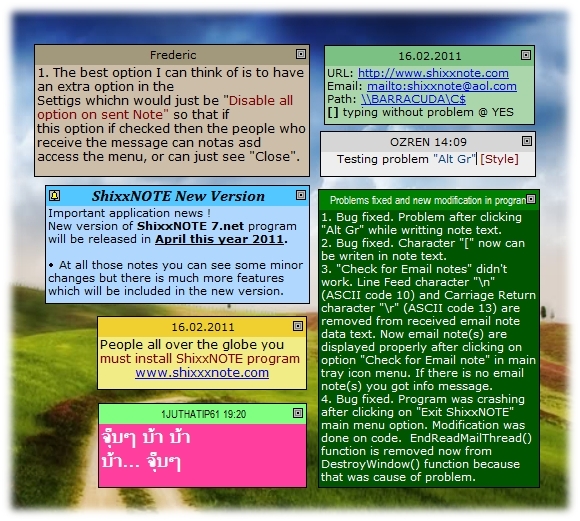
It is time for new version of my program ShixxNOTE. There are lot of changes (autodetect URL in note text, transparency, etc.) and few bug fixes in program which you will be able to see on page "What's new" on program home page. Default ShixxNOTE language is English new version will be localized on German, Spanish and Italian language. New program version ShixxNOTE 7.net will work on any Windows platform. It doesn't need any framework or runtime so you can install program on old Windows 95 or new Windows 7. Still program is written in C++ and because of that it is quick, small and neat. It is client/server application so you have to enable in your Firewall program default ShixxNOTE program port "2000" or just click on button "Allow access" on dialog which appears on first program start on Windows 7. You have to do that if you want program to work properly in your LAN (sending and receiving notes). Because one program thread is listening on default port for received note data. In new version there is new function for reading your network (LAN) at program startup and it is faster then previous one. New version release will be available for download in December 2012.

On this image you can see screen shot of ShixxNOTE 7.net beta version (click to see larger picture):

Click to see larger picture.
Every potential customer who register current ShixxNOTE 6.net program version till December 2012 will get new stable version of ShixxNOTE 7.net and a license bonus for the same price. That means, if you now register for example ShixxNOTE 6.net 5-Users License which costs $24.95, in December 2012 you will get registered ShixxNOTE 7.net 10-Users License version, because you have license bonus.

So register now current program release and get license bonus for new version which will be released in December, 2012.

Kind regards,

Ozren Sirola
ShixxNOTE developer
admin@shixxnote.com
http://www.shixxnote.com/

Saturday, October 24, 2009

ShixxNOTE 6.net on Windows 7

I can say that ShixxNOTE 6.net is working on latest Microsoft operating system Windows 7 (all editions Home Premium, Professional, Ultimate). Soon I will put some screenshots so you will be able to see it.
Reason for this is that ShixxNOTE program is written in C++ program language using Visual Studio 6. And because of that it doesn't require any framework or runtime. Program is using all functions from Microsoft original libraries (DLL's) except one "dll" which is used for image handling but this "dll" is also written in C++ program language.
So my ShixxNOTE program is ready for all future operating systems released from Microsoft Corporation as the latest one Windows 7 which is really good operating system.

But there is one minor "problem". When you start your computer ShixxNOTE is reading your network neighborhood, before on Windows Vista and all old Windows operating systems that last few seconds or maximum few minutes. On Windows 7 you can experience that you see small ShixxNOTE program dialog above the clock in the task bar, which says "Reading your network neighborhood. Wait for few seconds ...", for up to 5 minutes if you have more than 20 computers in your LAN. In a new version which will be soon released I have implemented fast network reading which will solve this little "problem" and program will read your network in a seconds on all old and future Windows operating systems.
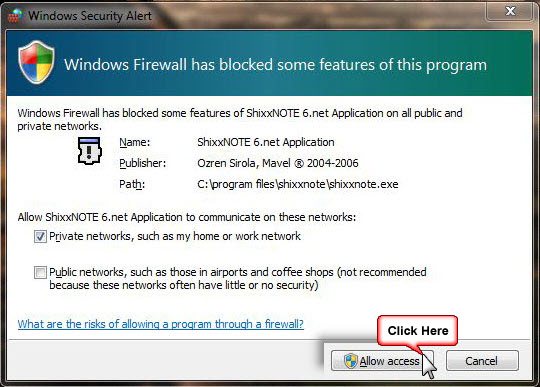
Also if you have problems with sending or reading note(s) then you should manage Windows Firewall and add "ShixxNote.exe" program in exception program list. If you get dialog like picture bellow, click on button "Allow access" and check box like on the picture. This is picture from Windows Security and that could be reason why suddenly you can send or receive note. If you still experience some problems with firewall be sure that port 2000 is open for ShixxNOTE to run normally and that “ShixxNote.exe” file should be in list where are programs that are not blocked by firewall or some other security program.
Write me if you have any problem running ShixxNOTE on Windows 7 operating system if you read this article. I will always answer you promptly on any email with some question.

Kind regards,

Ozren Sirola
ShixxNOTE Program Developer

Thursday, February 15, 2007

ShixxNOTE 6.net ready for Windows Vista


Everybody is talking about Windows Vista and how will old programs work on new Microsoft Windows platform. So I decided to check if ShixxNOTE 6.net is ready for Windows Vista. I have installed Windows Vista Ultimate version on one new computer in my LAN. Everything was prepared for installation of ShixxNOTE 6.net latest release (December 2006).
After running setup file, I got security message if I trust publisher (simple click on yes). Then second question from Windows Firewall asking you to choose „Block“ or „Unblock“ ShixxNOTE program, you must click on „Unblock“ button because network functions, sending and receiving notes will not work properly if you click otherwise (read more about this topic in previous articles). And that was all, installation was completed and ShixxNOTE 6.net was ready for use.


I must say that I was very excited with new look and style of all program dialogs and menus. Dialogs and menus really looks great on Vista. Here you can see some screenshots.


Sending and receiving notes works without any problem. I have tested sending and receiving notes, between computer running ShixxNOTE 6.net on Windows XP and this new one running program on Windows Vista Ultimate and everything works perfect. Reading network neighborhood and all other network features works normal.


So if you have bought Windows Vista you can freely install ShixxNOTE 6.net program on your computer. Program is 100% „Windows Vista ready“ and you can be sure it will work.


So at the end I must say that I am proud, because ShixxNOTE 6.net (developed in Visual C++ 6.0) works on every Windows operating system from Windows 95 to newest one Windows Vista. And you can send and receive note(s) without worrying which Windows operating system is installed on other computers in your LAN.

Ozren Sirola

Wednesday, August 09, 2006

Windows Firewall and ShixxNOTE

Windows 7 Firewall security dialog where you must click Allow Access button to enable sending and receiving notes
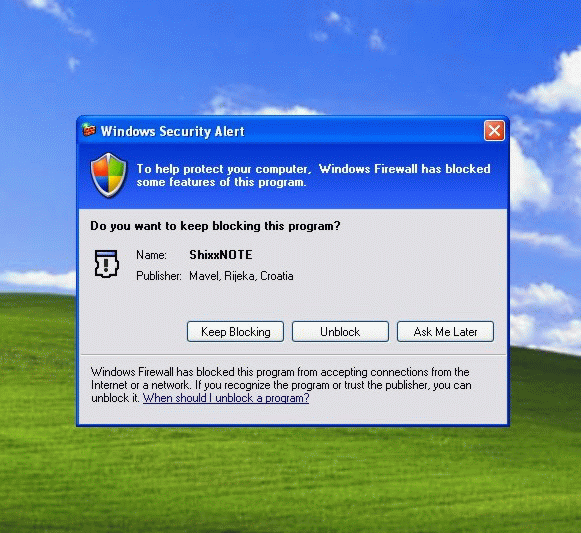
If you have Windows Firewall activated on your computer and it is "On", after ShixxNOTE program first start you will probably get Windows Security Alert dialog. If you have Windows 7 installed then you will get dialog (first picture above) asking you to allow access to ShixxNOTE program ; if you have Windows XP then dialog (second picture) will appear asking you to unblock program (check the picture above). This is normal because ShixxNOTE is multi thread client/server application (LAN messenger). You can send note and receive notes to others in your LAN. For sending and receiving notes ShixxNOTE program communication port must be open. So if you get this dialog you have to click on Unblock or Allow access button to enable sending and receiving note(s) feature. After you click "Unblock" or "Allow access" ShixxNOTE program will be added in Windows Firewall - Exceptions dialog and will work properly in your network.

Windows XP Firewall security dialog where you must click Unblock button to enable sending and receiving notes
If you have Windows 7 installed then you can open Windows Firewall with Advanced Security dialog and if you allowed access to program you will get dialog like picture bellow.

Windows 7 Firewall with Advanced Security dialog (click to see larger image)
If you click Cancel or Keep Blocking button then you will not be able to receive notes from others. Because Windows Firewall will block incoming note data for ShixxNOTE program.

Also you can always open ShixxNOTE communication port "2000" manually in "Local area connections" - "Advanced tab". If you don't know how write me and I will help you.

If you have any problems with sending or receiving notes in program, check your firewall settings first. If you didn't fix the problem ask your network administrator to help you.

And finnaly write me if you have any problem regarding sending and receiving notes, or any other problems with program.

Ozren Sirola
admin@shixxnote.com